What you actually get when you look for an app
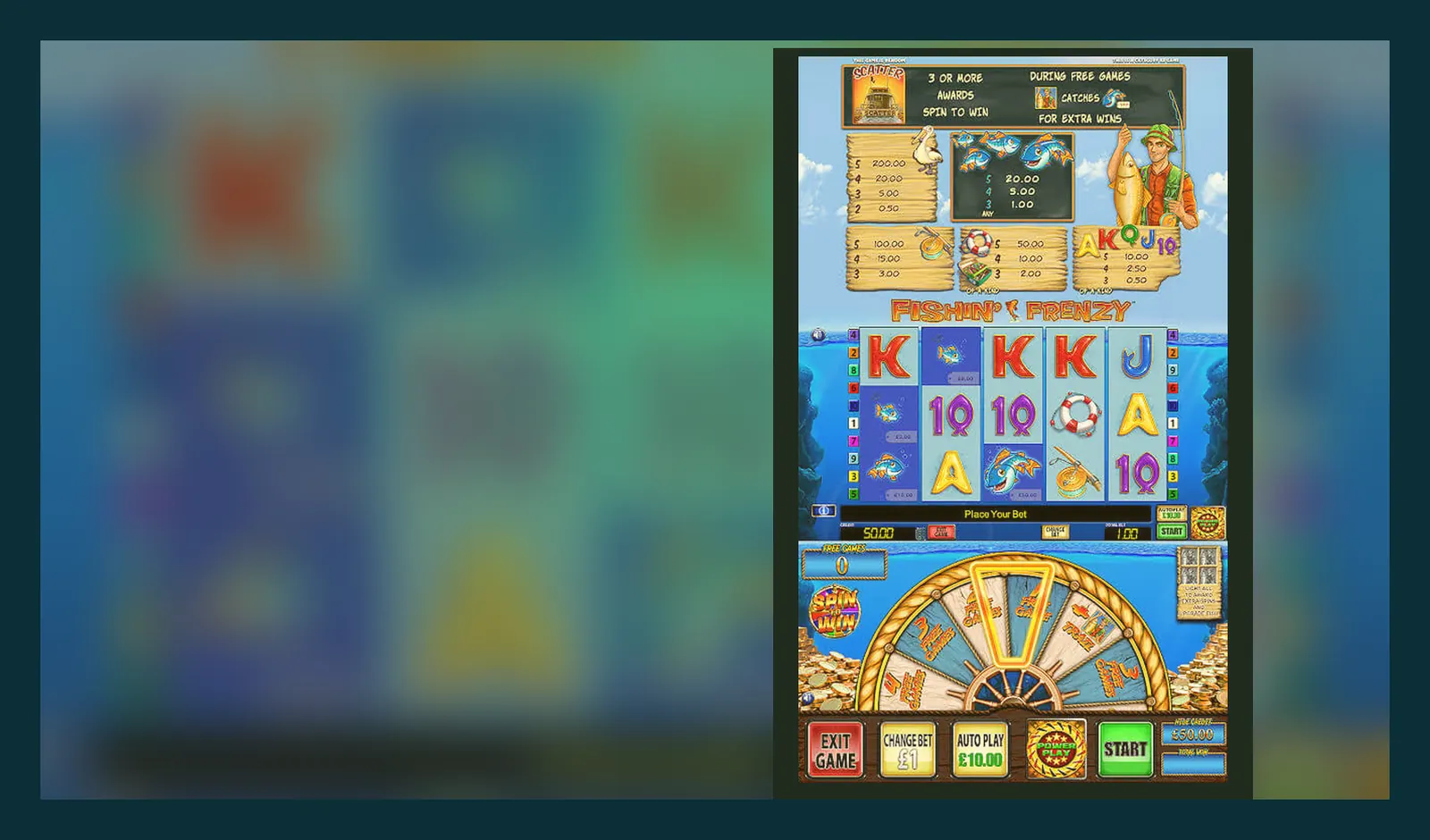
Here's what isn't quite right: Fishin Frenzy doesn't have a dedicated app in the Google Play Store or the App Store. Every «download Fishin Frenzy APK» result you see is either a third-party casino wrapper, a scam, or a browser shortcut dressed up as an install.
The game runs in your mobile browser — Safari, Chrome, or the in-app browser that opens when you tap a link. You can save it to your home screen for one-tap access, but that's a bookmark, not a native application. Some UKGC-licensed operators do offer their own casino apps, and Fishin Frenzy will load inside those, but the game itself remains browser-based HTML5.
The store card you won't find on Google Play
If Fishin Frenzy were a standalone app, its listing would look something like this — these numbers reflect what a popular slot would carry if it existed as a discrete download:
But that card is hypothetical. Blueprint supplies the game to casino operators; those operators either run a responsive website or build an app that houses dozens of slots. You'll never install «just Fishin Frenzy» — you install the operator's platform, then find the game in the lobby.
Five screens you'd see if you did open an app
- **Splash and age gate** — operator logo, then a «Confirm you are 18 or over» check before you reach the lobby. UKGC rules require age verification before any real-money deposit, and most sites now ask for proof of identity at sign-up rather than waiting until your first withdrawal.
- **Lobby with search and filters** — a grid of game tiles, search bar at the top, filters for provider, volatility, and feature type. Fishin Frenzy would sit under «Blueprint» or «Top Slots». Tap the tile and it loads full-screen.
- **Game screen** — reels fill most of the display, spin button bottom-centre, stake selector and paytable icon in the corners. A hamburger menu in the top-left takes you back to the lobby or opens account settings. The blue fishing-boat aesthetic stays faithful to the desktop version.
- **Deposit and withdrawal panel** — accessible from the account menu. You'd see Faster Payments, PayPal, Apple Pay as funding options (credit cards have been banned for gambling in the UK since 2020). The panel also shows your deposit limits and a link to GAMSTOP if you need to self-exclude across all UKGC-licensed sites.
- **Notifications and promotions** — a tab for active bonuses, wager progress, and responsible-gambling reminders. Stake caps of £5 per spin (£2 if you're 18–24) are enforced at game level; the app won't let you exceed them even if you try.
These screens describe the operator's app experience, not a standalone Fishin Frenzy application. The game itself is embedded content served by Blueprint's platform.
Four ways people think they're installing it, and what actually happens
Each path below ends with the same outcome — browser-based play — but the steps and risks differ:
- **Mobile browser, add to home screen** — visit a UKGC-licensed casino site in Safari or Chrome, find Fishin Frenzy in the lobby, tap the browser's share icon, choose «Add to Home Screen». You now have a shortcut that opens the game directly. Zero risk, zero install, and no permissions requested. This is the cleanest route.
- **Operator's native app from the Play Store or App Store** — search for a licensed casino (check the UKGC register and match the licence number in the app's footer), download the official app, sign in, navigate to Fishin Frenzy. The game still runs in a web view inside the app, but the wrapper gives you push notifications and faster lobby access. Medium risk: you're trusting the operator's security and account handling. Verify the developer name matches the brand and read recent reviews for withdrawal complaints.
- **Third-party APK from a file-sharing site** — someone has packaged a web view that points to a casino URL into an APK and uploaded it outside the Play Store. Installing it requires enabling «Unknown sources» in Android settings. High risk: no vetting, no updates, possible malware, and you're handing over device permissions to an anonymous builder. If the APK requests contacts, SMS, or camera access for a slot game, it's a red flag. Legitimate casino apps ask for storage (to cache assets) and location (to confirm you're in a legal jurisdiction), nothing more.
- **Fake «Fishin Frenzy Slot Free Coins» app** — a common scam. The app promises free spins or coins, asks you to log in with your casino credentials or complete offer walls, then either harvests your login or serves ads without ever connecting to a real casino. These clones often use Blueprint's artwork without permission and request invasive permissions (phone state, call logs, SMS). Installing one violates Play Store terms and puts your account at risk. If an app asks for your casino password or wants to send SMS on your behalf, delete it immediately.
What your phone needs to run it smoothly
Fishin Frenzy is lightweight HTML5, so the bar is low:
- **Operating system** — iOS 13 or Android 8.0 and up. Anything from the last five years will work.
- **Browser** — Safari 13+, Chrome 80+, Firefox 85+, or Edge 90+. The game uses WebGL for animations, so very old or niche browsers may stutter.
- **RAM** — 2 GB minimum, 3 GB comfortable. If your phone struggles with multiple browser tabs, close background apps before spinning.
- **Storage** — the game itself doesn't install, but the browser will cache ~2 MB of assets (reel strips, sound files, paytable images). If you're tight on space, clear your browser cache after a session.
- **Connection** — 3G works, 4G or Wi-Fi is better. The initial load pulls ~1.5 MB; after that, data use is minimal unless you're streaming live casino games in parallel.
No special GPU or flagship processor required. A £150 budget Android will run Fishin Frenzy as smoothly as a £1,000 iPhone, because the heavy lifting happens on Blueprint's servers — your phone just renders the result.
What the app (or browser bookmark) actually does
Whether you open Fishin Frenzy from a casino app, a home-screen shortcut, or a browser tab, the functionality is identical:
- **Loads the game client** — connects to Blueprint's game server, retrieves your session token from the operator, and renders the 5×3 reel grid with your current balance.
- **Handles stake and spin logic** — every spin sends your stake and a timestamp to the server; the server runs the RNG, determines the outcome, and sends back the result (win amount, symbol positions, whether the free-spins feature triggered). Your phone displays the animation, but the maths happens remotely. This is why airplane mode kills the game — there's no local RNG to fall back on.
- **Enforces regulatory caps** — if you're playing on a UKGC-licensed site, the client won't let you set a stake above £5.00 per spin (or £2.00 if you verified your age as 18–24). The cap is server-side, so tampering with the app or using browser dev tools won't bypass it.
- **Caches assets for speed** — after the first load, reel symbols, background graphics, and sound effects are stored in your browser's cache. Subsequent sessions load in ~2 seconds instead of ~8. Clearing your cache will make the next launch slower but won't affect game outcomes.
- **Syncs balance and history** — your account balance and spin history live on the operator's server, not your device. Switch from your phone to a laptop mid-session and you'll pick up exactly where you left off. If the game crashes, refresh the page — any spin that completed on the server (meaning you saw a result, even for a split second) is recorded; incomplete spins are voided and the stake refunded.
Changelog: what changed in the latest version that doesn't exist
Because Fishin Frenzy isn't a downloadable app, there's no version number you manually update. Blueprint pushes changes to the game server, and every operator serving the game receives them automatically. You might notice small tweaks between sessions — a faster animation, a repositioned button, a new responsible-gambling reminder — but you didn't install anything.
Recent server-side updates across Blueprint's slot catalogue (October 2026 and earlier) have included:
- **Stake-cap enforcement for 18–24 players** — following the April 2026 rules, the game now checks the player's age from the operator's KYC data and locks the maximum stake to £2.00 for that cohort. Previously, the £5.00 cap applied uniformly.
- **Faster asset loading on 4G** — Blueprint recompressed the sprite sheets and switched to WebP for non-animated graphics, cutting initial load time by ~30%. You'll see this as a quicker transition from lobby to game screen.
- **Session-timer reminder** — a discreet overlay now appears after 60 minutes of continuous play, showing your net position and offering a break. It's dismissible but reappears every hour. UKGC advertising guidance now recommends these nudges, and most operators have adopted them.
- **Autoplay limit reduction** — autoplay used to allow 100 spins; it's now capped at 50, with a mandatory stop if your balance drops by more than 50% or if you trigger the free-spins feature. This change rolled out across all Blueprint games in September 2026.
None of these updates required you to visit a store or approve an install. The next time you opened the game, the changes were live. This is the advantage of browser-based slots — and the reason standalone app listings for Fishin Frenzy are either outdated wrappers or outright fakes.
Spotting a fake clone and the permissions that give it away
Scam apps typically mimic Blueprint's branding, promise «unlimited free coins» or «guaranteed bonus rounds», and request permissions that no legitimate slot needs. Here's how to separate real from fake:
| What it asks for | Legitimate use | Red flag if… |
|---|---|---|
| Storage | Cache game assets (images, sounds) so the next launch is faster | It wants to «read and modify all files» rather than just app-specific storage |
| Location | Confirm you're in a jurisdiction where online gambling is legal (geofencing) | It asks for «precise location» in the background, or the app is marketed as «play anywhere, no restrictions» |
| Network / Internet | Connect to the casino server to load the game and sync your balance | No red flag — every real-money game needs this |
| Phone state / Device ID | Some operators use your device ID for fraud detection (multiple accounts on one phone) | It asks for «read phone status and identity» when it's supposed to be a free-play or demo-only app |
| SMS / Contacts | Legitimate casino apps never need these | Instant red flag — used to send premium SMS, scrape your contact list, or intercept two-factor codes |
| Camera / Microphone | Only used during KYC (upload a photo of your ID or passport) | If a «free coins» or demo app asks for camera access before you've even created an account, it's malicious |
| Install other apps | Never needed for a slot game | Instant red flag — used to install adware or additional malware |
Additionally, check the developer name. Blueprint Gaming doesn't publish standalone slot apps; if the developer field says «Fishin Frenzy Studio» or «Free Casino Coins Ltd», it's unofficial. Cross-reference the operator's website and app — both should carry the same UKGC licence number in the footer. If the app's privacy policy is a broken link or machine-translated nonsense, don't install it.
FAQ
Can I download Fishin Frenzy directly from the Play Store or App Store?
No. Blueprint Gaming doesn't publish a standalone Fishin Frenzy app. The game is browser-based HTML5, and you access it through a UKGC-licensed casino's website or that operator's own app. Any «Fishin Frenzy» listing you find on file-sharing sites or unofficial stores is either a third-party wrapper (at best) or a scam (at worst). Save the casino site to your home screen for one-tap access — it's faster and safer than hunting for APKs.
How much storage and data does the game use on mobile?
The game doesn't install in the traditional sense, so it takes no permanent storage. Your browser will cache roughly 2 MB of assets (reel graphics, sounds, paytable images) after the first session, which speeds up subsequent loads. Data use is around 1.5 MB for the initial connection, then negligible — perhaps 100 KB per hour of play — because only bet and result data travel between your phone and Blueprint's server, not video streams.
What permissions should a legitimate casino app ask for, and which are warning signs?
Legitimate casino apps typically request storage (to cache game files) and location (to confirm you're in a legal jurisdiction — geofencing is mandatory for UKGC operators). Some also ask for device ID for fraud detection. Red flags: SMS or contacts (used to scrape data or send premium-rate messages), camera or microphone before you've started KYC, «install other apps», or «read phone status» on a free-play app. If the app wants more access than your banking app, walk away.
Do I need to update the game manually, or does it happen automatically?
Automatic. Because Fishin Frenzy runs on Blueprint's remote servers, updates are pushed server-side and apply to everyone the moment you load the game. There's no app-store update to approve, no version number to check. If Blueprint tweaks the UI, adjusts animation speed, or enforces a new responsible-gambling feature (like the recent stake cap for 18–24 players), you'll see it the next time you open the game — no action required on your end.
I found an APK that promises unlimited free spins. Is it real?
No. Every spin's outcome is determined by Blueprint's server-side RNG, which is audited by independent testing labs and inaccessible from your device. An APK can fake a pretty interface and let you click buttons, but it can't alter the maths. Most «unlimited coins» or «free bonus» APKs are fronts for ad farms, phishing, or malware. If it sounds too good to be true and asks for invasive permissions, it's a scam. Real free-play demos are available on UKGC-licensed sites once you've age-verified — no dodgy APK required.